Chapter 2 — Button, Button
What you want now is to actually see something on the screen. A “Hello World” message is boring.
It would be nice to have as a target some kind of simple working program, and what is simpler than incrementing a counter? Let's try for a umpire's ball and strike counter and see if we can get anywhere.
android create project \
--target 1 \
--name UmpireApp \
--path ./UmpireAppProject \
--activity UmpireAppActivity \
--package com.example.myandroid
This gives us the same tree with a different app name, but now I want to steal some XML layout code from different examples and see if I can produce some buttons and fields to display counters:
<?xml version="1.0" encoding="utf-8"?>

<LinearLayout xmlns:android="http://schemas.android.com/apk/res/android"
    android:id="@+id/root"
    android:orientation="vertical"
    android:gravity="center_horizontal"
    android:layout_width="fill_parent"
    android:layout_height="wrap_content">

  <LinearLayout
      android:orientation="horizontal"
      android:layout_width="fill_parent"
      android:layout_height="wrap_content">

    <Button
        android:id="@+id/ball_button"
        android:text="Ball"
        android:layout_width="wrap_content"
        android:layout_height="wrap_content"
        android:layout_weight="1"/>

    <EditText
        android:id="@+id/ball_count"
        android:text="0"
        android:focusable="false"
        android:layout_width="wrap_content"
        android:layout_height="wrap_content"
        android:layout_weight="1"/>
  </LinearLayout>

  <LinearLayout
      android:orientation="horizontal"
      android:layout_width="fill_parent"
      android:layout_height="wrap_content">

    <Button
        android:id="@+id/strike_button"
        android:text="Strike"
        android:layout_width="wrap_content"
        android:layout_height="wrap_content"
        android:layout_weight="1"/>

    <EditText
        android:id="@+id/strike_count"
        android:text="0"
        android:focusable="false"
        android:layout_width="wrap_content"
        android:layout_height="wrap_content"
        android:layout_weight="1"/>
  </LinearLayout>

  <Button
      android:id="@+id/reset_button"
      android:text="Reset"
      android:layout_width="wrap_content"
      android:layout_height="wrap_content"
      android:layout_weight="1"/>
</LinearLayout>
Which produces the relatively lame looking:
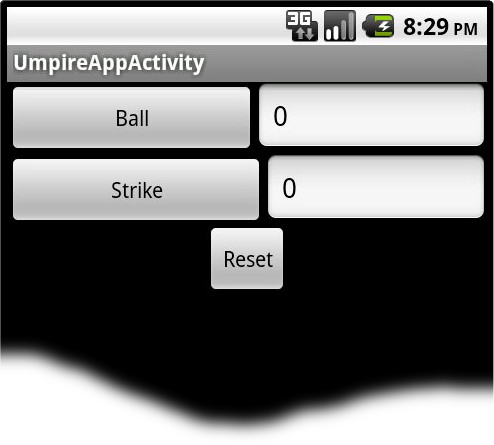
Surely, I can get the buttons to line up better than that. I guess I need to learn what sort of stuff things like android:layout_width can actually do.
It is time for a visit to http://developer.android.com/guide/topics/ui/declaring-layout.html, which describes the meaning of wrap_content versus fill_parent. I change the button and text fields to use fill_parent:
<?xml version="1.0" encoding="utf-8"?>

<LinearLayout xmlns:android="http://schemas.android.com/apk/res/android"
    android:id="@+id/root"
    android:orientation="vertical"
    android:gravity="center_horizontal"
    android:layout_width="fill_parent"
    android:layout_height="wrap_content">

  <LinearLayout
      android:orientation="horizontal"
      android:layout_width="fill_parent"
      android:layout_height="wrap_content">

    <Button
        android:id="@+id/ball_button"
        android:text="Ball"
        android:layout_width="fill_parent"
        android:layout_height="fill_parent"
        android:layout_weight="1"/>

    <EditText
        android:id="@+id/ball_count"
        android:text="0"
        android:focusable="false"
        android:layout_width="fill_parent"
        android:layout_height="fill_parent"
        android:layout_weight="1"/>
  </LinearLayout>

  <LinearLayout
      android:orientation="horizontal"
      android:layout_width="fill_parent"
      android:layout_height="wrap_content">

    <Button
        android:id="@+id/strike_button"
        android:text="Strike"
        android:layout_width="fill_parent"
        android:layout_height="fill_parent"
        android:layout_weight="1"/>

    <EditText
        android:id="@+id/strike_count"
        android:text="0"
        android:focusable="false"
        android:layout_width="fill_parent"
        android:layout_height="fill_parent"
        android:layout_weight="1"/>
  </LinearLayout>

  <Button
      android:id="@+id/reset_button"
      android:text="Reset"
      android:layout_width="fill_parent"
      android:layout_height="fill_parent"
      android:layout_weight="1"/>
</LinearLayout>
And I wind up with the somewhat more pleasing:
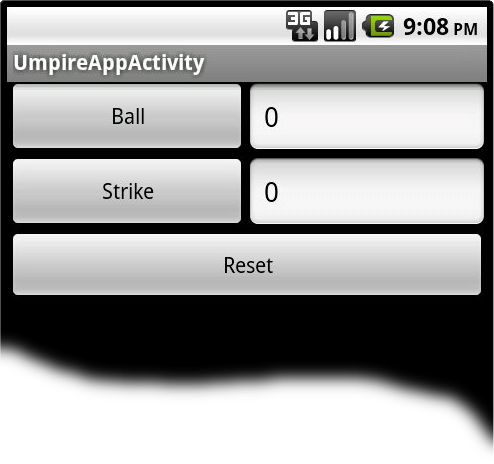
The title bar up there is still kind of irritating though. I probably don't need it. Google finds this: http://stackoverflow.com/questions/7529845/want-to-remove-textview-on-top-of-screen, so I follow the advice:
<?xml version="1.0" encoding="utf-8"?>
<manifest xmlns:android="http://schemas.android.com/apk/res/android"
      package="com.example.myandroid"
      android:versionCode="1"
      android:versionName="1.0">
    <application android:icon="@drawable/icon"
                 android:label="@string/app_name" >
        <activity android:name="UmpireAppActivity"
                  android:theme="@android:style/Theme.NoTitleBar"
                  android:label="@string/app_name">
            <intent-filter>
                <action android:name="android.intent.action.MAIN" />
                <category android:name="android.intent.category.LAUNCHER" />
            </intent-filter>
        </activity>
    </application>
</manifest>
And now I have this:
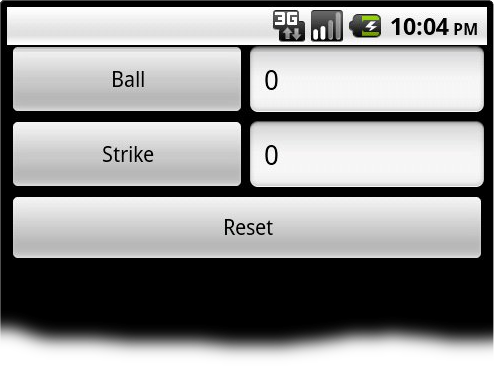
That's probably enough fooling with appearance for now.